69 customers needed final notice letters. Each letter had to be personalized with their outstanding balance, invoice details, and a unique reference number. Each letter needed to be bundled with the corresponding invoices. Then everything had to be sent via registered mail (LRAR in France - the legal step before escalation).
The manual approach? A full day of copy-paste, file hunting, and error-prone tedium.
Here’s how I did the whole thing in under an hour using Claude Code, Cursor, Google Sheets, and a few Python scripts.
The full workflow
Billabex data export (CSV)
    ↓
Data transformation (Python)
    ↓
Mail merge (Google Sheets + Autocrat)
    ↓
File organization (Python)
    ↓
Ready for La Poste API
Each step took minutes, not hours. Let me walk through the whole chain - including the parts where I got stuck.
Step 1: Data transformation
The starting point was a Billabex export with 87 rows - one row per invoice. But I needed one row per customer for the mail merge, with all their invoices consolidated into a single text field.
The problem: some customers had 1 invoice, others had up to 6. Classic pivot problem.
Here’s how the conversation with Claude went:
Me: I have a Google Sheet with invoice data. Some customers appear on multiple lines (1 line per invoice) but some cells stay empty. Does that cause problems for mail merge?
Claude: No, that’s exactly the right structure! But for mail merge you’ll need 1 row = 1 document. I can transform the data - group by customer, concatenate invoices into a single text field.
Claude analyzed my data and found the distribution: 59 customers with 1 invoice, 7 with 2, and a few outliers with up to 6. Then it generated a transformation script.
The key logic - grouping by reference and formatting each invoice line:
import pandas as pd

def format_invoice_line(row, idx):
    amount = f"{row['remaining_balance']:,.2f}".replace(",", " ").replace(".", ",")
    date = pd.to_datetime(row['due_date']).strftime('%d/%m/%Y')
    return f"{idx}. {row['invoice_number']} - {amount} € TTC (échéance {date})"

# Group by customer reference, concatenate invoices
for ref, group in df.groupby('reference', sort=False):
    first = group.iloc[0]
    invoices_lines = [format_invoice_line(row, i+1) for i, (_, row) in enumerate(group.iterrows())]

    result.append({
        'reference': ref,
        'customer_name': first['customer_name'],
        'customer_address': first['customer_address'],
        'outstanding_balance': first['oustanding_balance'],
        'invoices_text': '\n'.join(invoices_lines)  # All invoices in one field
    })
The output: a clean 69-row file where each customer has one row, and their invoices_text field contains a formatted list like:
1. FA00143512 - 298,78 € TTC (échéance 06/01/2025)
2. FA00147961 - 14 907,04 € TTC (échéance 14/06/2025)
Time: ~10 minutes (including back-and-forth to handle edge cases like missing balances).
Step 2: Mail merge with Autocrat
With clean data, the mail merge itself was trivial. I imported the transformed Excel into Google Sheets, opened my letter template in Google Docs with placeholders, and ran Autocrat.
Then nothing worked. The PDFs generated with the right filenames, but the variables weren’t replacing.
Me: It’s not working. The PDFs are generated with the reference but the variables don’t change.
Claude: Check the placeholder syntax. In your Google Doc, Autocrat uses <
> not {{tag}}. Replace all {{customer_name}} with <<customer_name>> etc.
I’d copied my template from another system that used double curly braces. Quick find-and-replace fixed it.
Then another issue:
Me: It worked but I have 2 pages in the PDF instead of 1.
Claude: The problem is in your template - there’s a blank page at the start. Place your cursor at the very beginning and delete any page breaks or empty lines before the content.
Time: ~15 minutes (including troubleshooting both issues).
Output: 69 personalized PDFs named by reference number (LPC-20260119-0001.pdf, etc.).
Step 3: File organization
Now I had a flat directory with:
- 69 final notice PDFs
- 87 invoice PDFs
- A CSV mapping everything together
Each customer needed a folder with their letter + their invoices. The data was all there - I just needed to connect the dots.
Back to Claude Code:
Me: I need to organize files into customer folders. Each folder should contain the final notice letter plus all related invoices. The CSV has the mapping.
Claude: I’ll create two scripts - one to organize, one to verify. The verification step is important: automation without verification is just faster mistakes.
organize_invoices.py creates folders and copies files:
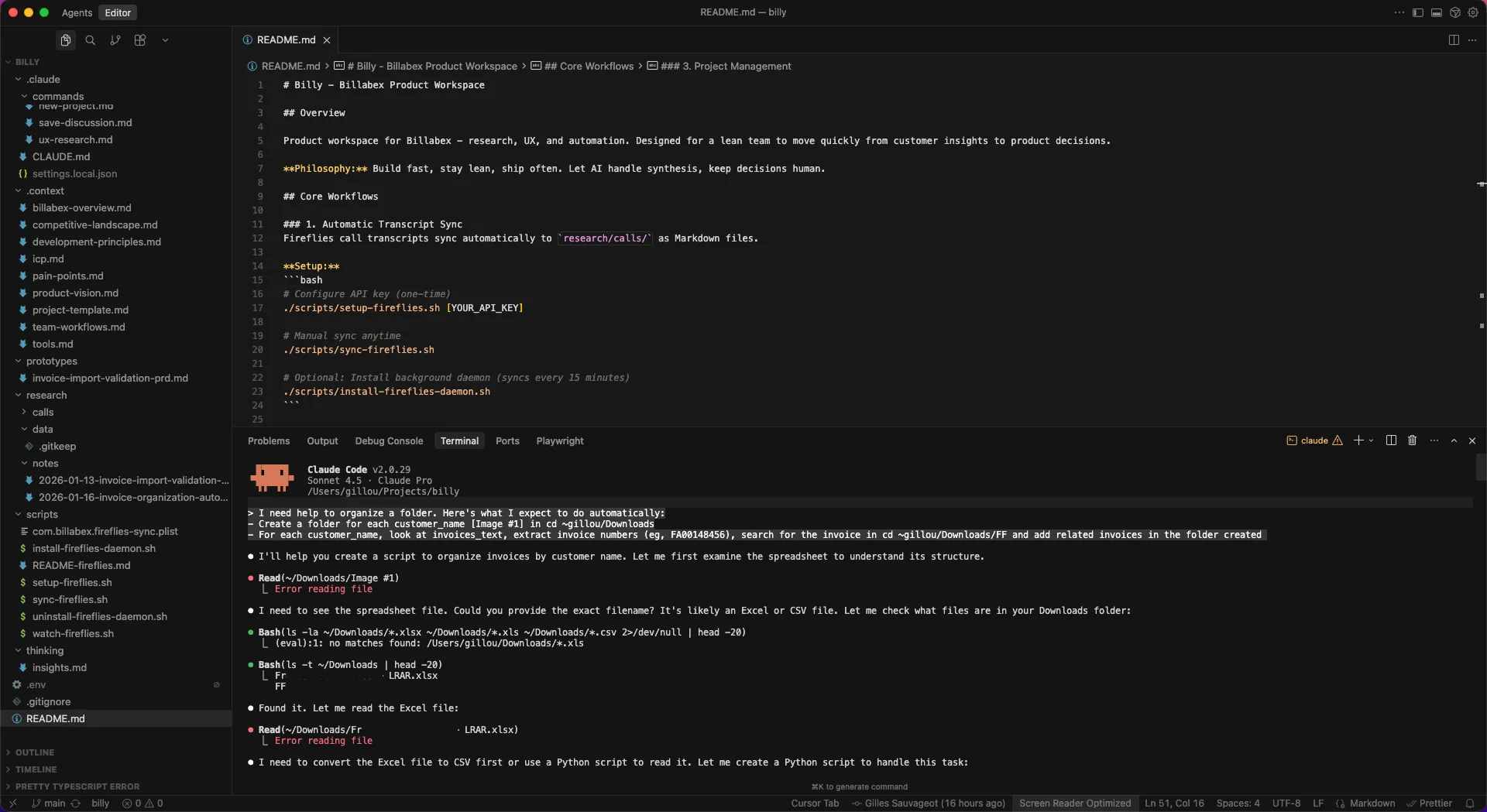
pattern = r'FA\d{8}'  # Extract invoice numbers from text field

for row in csv_reader:
    customer_name = sanitize_folder_name(row['customer_name'])
    folder_path = os.path.join(output_dir, customer_name)
    os.makedirs(folder_path, exist_ok=True)

    # Copy final notice
    shutil.copy(f"{source_dir}/{row['reference']}.pdf", folder_path)

    # Copy all invoices (extracted via regex)
    for inv_num in re.findall(pattern, row['invoices_text']):
        shutil.copy(f"{source_dir}/{inv_num}.pdf", folder_path)
verify_organization.py checks that nothing was missed:
- Does every folder have its expected letter?
- Are all expected invoices present?
- Any extra files that shouldn’t be there?
The verification script caught one issue during development: I’d moved the source CSV to a subdirectory and forgot to update the path. Better to catch that in a script than discover it 30 folders in.
Time: ~10 minutes
Result:
69 customer folders created
69 final notice letters copied
87 invoice PDFs copied
0 missing files
0 errors
Step 4: Ready for La Poste API
With organized folders, the next step is uploading to La Poste’s registered mail API. That’s a separate automation - but the hard part (data wrangling, document generation, file organization) is done.
Total time: ~45 minutes for the entire workflow.
The toolkit
My daily stack for this kind of work:
- Claude Code - conversational coding, debugging, and iteration
- Cursor - IDE with Claude integration for longer sessions
- Google Sheets + Autocrat - quick mail merge without code
- Python - when I need more control than no-code tools offer
The pattern is always the same: describe what I need, let Claude generate the first version, run it, hit a wall, debug together, add verification.
Why this matters
At a 3-person company, a full day of manual work isn’t just boring - it’s expensive. That’s a day not spent on product, customers, or thinking.
But the bigger win is repeatability. This exact workflow will run again next month. And the month after. The scripts are saved. The Autocrat job is configured. Next time, it’s 15 minutes instead of 45.
Takeaways
- Start from the data. If you have a clean export with the right relationships, you’re 80% done. Invest time in the data transformation step.
- Chain simple tools. No single tool did everything here. The power came from connecting Billabex → Python → Google Sheets → Autocrat → Python → La Poste.
- Always verify. Automation without verification is just faster mistakes. Write the check script before you trust the result.
- Show your blockers. I shared screenshots when stuck. Claude diagnosed the
<
> syntax issue from looking at my Autocrat config. Don’t just describe the problem - show it.