More and more people use AI to write code or automate workflows. I used it to build the system that should help run Billabex.
Three months ago, I had 56 customer call recordings scattered across Fireflies. Notes from demos lived in Google Docs. Product decisions happened in Slack threads I couldn’t find later. When someone asked “why did we build it this way?” - I had no answer.
Today, those 56 transcripts sync automatically to my local repo every 15
minutes. I type /ux-research and Claude loads customer pain points, challenges
my assumptions with evidence, and generates an implementation-ready PRD. Another
command creates Linear projects. Another handles git. Every major decision gets
documented automatically.
This is the story of how I built that system - and what I learned about working with AI along the way.
The problem: Everything was everywhere
Running a 3-person SaaS (Billabex - AI-powered invoice collection) means wearing every hat. PM, researcher, designer, customer success. The information I needed was always somewhere - just never where I needed it.
A typical feature decision looked like this:
- Remember a customer mentioned something relevant (which call was it?)
- Search Fireflies, find 3 possible transcripts
- Download and skim each one
- Open a Google Doc to synthesize
- Forget to save the synthesis anywhere useful
- Three weeks later, repeat the entire process
The knowledge existed. The synthesis didn’t persist. Every decision started from scratch.
The vision: An Operating System, not a chatbot
I’d been using Claude Code for coding tasks - fixing bugs, writing scripts. But I kept having the same conversations:
“Here’s the context about our product…”
“Here’s what customers have told us…”
“Here’s how we make decisions…”
Every session, I re-explained everything. Claude Code had no memory. No institutional knowledge. No way to challenge my assumptions with data I’d already collected.
What if I could give Claude persistent memory? What if commands could trigger complex workflows? What if research data flowed automatically instead of manually?
That’s when I stopped thinking of Claude as a chatbot and started building an operating system.
The transformation: Before and After
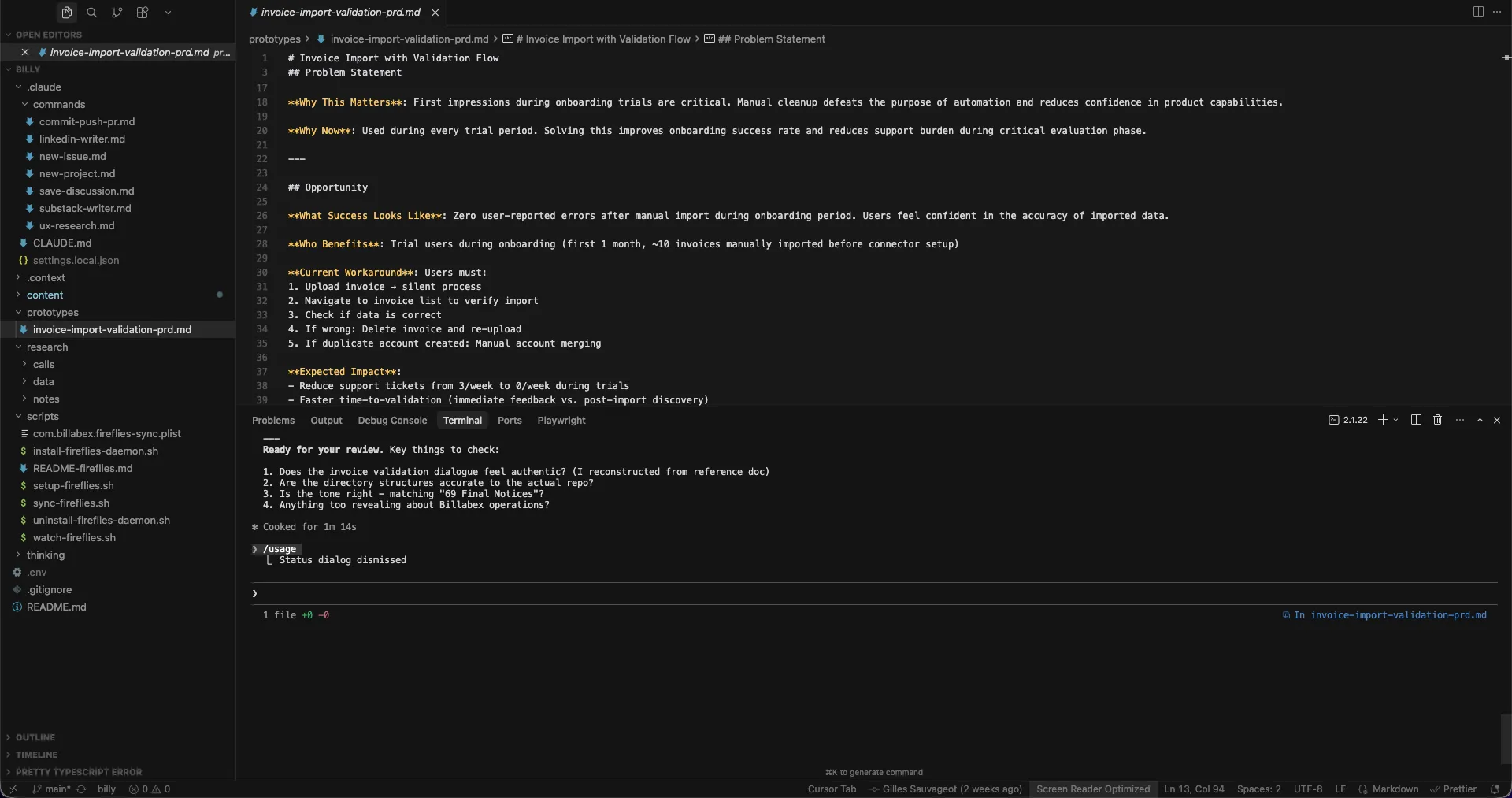
Here’s what changed over three months:
Before (October 2025)
product-partner/
├── .cursor/context.json          # Manual AI context
├── docs/
│   └── strategy/vision.md        # Aspirational doc
├── insights/
│   └── raw/fireflies/            # 15 manually downloaded transcripts
└── prompts/
    ├── raw-to-structured.md      # Manual prompt files
    └── insights-to-shaping.md
I was using Cursor, writing prompt files, running bash scripts to process data. The structure changed three times in ten days - I couldn’t find a shape that stuck.
After (January 2026)
billy/
├── .claude/
│   ├── CLAUDE.md                 # How we work together
│   └── commands/
│       ├── ux-research.md        # Evidence-based UX workflow
│       ├── new-project.md        # Linear project creation
│       ├── commit-push-pr.md     # Git automation
│       └── save-discussion.md    # Document decisions
├── .context/                     # Persistent memory (9 files)
│   ├── billabex-overview.md
│   ├── icp.md
│   ├── pain-points.md
│   └── ...
├── research/
│   ├── calls/                    # 56 auto-synced transcripts
│   └── notes/                    # Decision documentation
└── scripts/
    └── sync-fireflies.sh         # Daemon runs every 15 min
The structure stabilized immediately with Claude Code. When the tool fits your thinking, you stop fighting it. And yes, I’m using Claude Code into Cursor.
What the system actually does
Four custom commands handle 80% of my repetitive product work:
/ux-research - I describe a feature idea. Claude Code loads customer research
from research/calls/, challenges my assumptions with actual quotes, explores 2-3
UX approaches with trade-offs, and generates a PRD (one day, it will map to our
design system components but still too early). A recent session produced a
550-line implementation-ready spec for invoice validation - in 90 minutes.
/new-project - Creates a Linear project with our standard template.
Milestones, initial issues, project brief - all set up in one command.
/commit-push-pr - Reviews changes, drafts a commit message matching our style,
stages files, commits, pushes, optionally creates a PR. No more context-switching
to the terminal.
/save-discussion - At the end of a session, this captures everything: context,
key decisions, files modified, action items, next steps. Writes a structured
markdown file to research/notes/. Future sessions can reference past decisions.
The hidden win: Evidence-based challenges
The most valuable part isn’t speed - it’s pushback.
I wanted to add a simple file upload for invoice imports. Just a dropzone, quick and clean. Here’s what happened:
Me: Let’s design the invoice import flow. Simple upload, parse the file, done.
Claude: Before we design, I checked the research. Customers mentioned “data quality” 47 times across calls. Pain score: 3.8/5. The recurring pattern is invoices importing with wrong amounts or missing client info. A simple upload won’t address this - they need validation before the data enters the system.
Me: …okay, show me the validation approaches.
The final design was a two-step flow with PDF preview, field mapping, and explicit confirmation. Not what I initially wanted - but what customers actually needed.
Without the research loaded automatically, I would have built the simple version. Shipped it. Then spent weeks fixing data quality complaints.
Few numbers
- 60+ transcripts synced automatically (zero manual work after setup)
- 7 slash commands that replaced ~10 hours/week of manual operations
- 10+ discussion notes documenting major architectural decisions
- 1 daemon running every 15 minutes, keeping research current (not active yet
since I’d rather use
./scripts/sync-fireflies.shcommand to pull last transcripts from Fireflies)
Time saved matters less than decisions improved. Every feature can now start with “what did customers actually say?” and “what data do we actually have?” - because the data is right there.
What’s coming
This is the first post in a series. Here’s what I’ll try to cover:
- The paradigm shift from prompts to commands to agents (now live)
- How the Fireflies automation works (script, daemon, markdown transformation)
- Building the UX research agent that challenges my ideas
- The commands in detail - full workflow walkthrough
- Lessons learned after three months of building with AI
I’m not claiming this is the only way - or even the best way - to work with AI. But it’s working for me. A 3-person team trying to ship faster, making evidence-based decisions, and actually remembering why we built things the way we did.